The blog is moved to my personal website.
please see the section "Technical adventure"
http://tanin.nanakorn.com
Oct 24, 2012
Mar 19, 2012
OpenGL ES (Shader) facts #1
- There is no type-casting. Use constructor.
- When declaring float or vec, you must declare its precision, otherwise there would be a compile-time error.
- You cannot multiply float with integer because there is no type-casting.
- There is no left-shift and right-shift.
- When declaring float or vec, you must declare its precision, otherwise there would be a compile-time error.
- You cannot multiply float with integer because there is no type-casting.
- There is no left-shift and right-shift.

Manual Camera on iPhone
Today I have succeeded at streaming video from camera and showing it on the screen. Also, I have succeeded at manipulating pixels before showing it.
The normal way is to:
1. Write your own AVCaptureVideoDataOutputSampleBufferDelegate.
2. Get CVImageBuffer, which is from CVPixelBuffer
3. Manipulate pixels at their addresses
4. Create CVImageRef from CVImageBuffer
4. setContents of the CALayer with your CVImageRef
This is a normal way. You may also channel CVImageBufferRef to OpenGL in order to manipulate pixels with OpenGL Shader.
The vital technique is not to copy anything but to manipulate the pixels at their addresses directly.
It seems to me that using OpenGL shader is a better idea because:
1. It is run on GPU. This means it does not consume CPU time.
2. It is optimized for parallel stuffs.
I'm too lazy to post the code here.
Mar 12, 2012
Deploying to iOS 4.2.1 problem
warning: Unable to read symbols for /Developer/Platforms/iPhoneOS.platform/DeviceSupport/4.2.1 (8C148)/Symbols/Developer/usr/lib/libXcodeDebuggerSupport.dylib (file not found). If you found this problem, it is because the OS is copied from your iPod/iPhone, and it does not have the necessary library. In order to solve it, you must copy
/Developer/Platforms/iPhoneOS.platform/DeviceSupport/4.2/Symbols/Developer /Developer/Platforms/iPhoneOS.platform/DeviceSupport/4.2/Symbols/usr And paste these folders under/Developer/Platforms/iPhoneOS.platform/DeviceSupport/4.2.1 (8C148)/Symbols/.
That's it.
DISPATCH_QUEUE_PRIORITY_BACKGROUND in dispatch_async causes EXC_BAD_ACCESS in iOS 4.2.1 and earlier
This is because DISPATCH_QUEUE_PRIORITY_BACKGROUND does not exist.
Please use
Please use
DISPATCH_QUEUE_PRIORITY_LOW.
!NO is not YES..
Today I have found out that
if (!NO) { ... }
is not working as I expect...
!NO is not a true statement.
if (!NO) { ... }
is not working as I expect...
!NO is not a true statement.
Use @property
Here is what caused the EXC_BAD_ACCESS, and it took me like 2 hours to solve it.
Notice that _someVar is released twice. It's super confusing.
Next time, just use @property.
And, when I want to release it, just set the property to nil.
You cannot really go wrong with @property...
Notice that _someVar is released twice. It's super confusing.
Next time, just use @property.
And, when I want to release it, just set the property to nil.
You cannot really go wrong with @property...
EXC_BAD_ACCESS with [CALayer retainCount]
EXC_BAD_ACCESS might mean many things.
Normally, it means that you release an autorelease object, release too many times, or use a released object.
Here is the way to debug it.
First of all, you need to turn on NSZombieEnabled. To turn it on:
1. you need to go to "Project -> Set Active Executable (...)"
2. Under the tab "Arguments" and in the box "Variables to be set in the environment", Add a new variable named "NSZombieEnabled" with the value "YES"
Now when you get an EXC_BAD_ACCESS, it will tell you what happens.
One of the scenarios is that you will get [CALayer retainCount].
This means that you release an autoreleased view or a view too many times.
Now you can go find out....
I took like 2 hours to find out that I release a view too many times....
Good luck!
Jan 4, 2012
ActionMailer in DelayedJob with Passenger
There is some strange class loading in Passenger.
You cannot use: MemberMailer.delay.notify_something
You have to create a new class and manually enqueue it.
..
Haven't written a blog in such a long time. I have been too busy with interviews.
Nov 13, 2011
Gamling.org was DDOSed
And this is my first experience with DDoS attacks.
It was funny how the server is blazingly fast after I enabled APF.
Therefore, of course, Gamling.org was nuked with DDoS.
What I did is that I use Advanced Policy-based Firewall (APF) and configure to allow only specified ports.
And I have installed Brute Force Detection (BFD) and DDoS Deflate in order to detect who nukes Gamling.org.
And I also add RootKit Hunter to check and remove Spyware from the server. (I didn't know that Linux also has Spyware :S)
It was funny how the server is blazingly fast after I enabled APF.
Therefore, of course, Gamling.org was nuked with DDoS.
What I did is that I use Advanced Policy-based Firewall (APF) and configure to allow only specified ports.
DEVEL_MODE="0"
IG_TCP_CPORTS="21,22,25,53,80,110,143,443,3306"
IG_UDP_CPORTS="53,111"
USE_AD="1"
And I have installed Brute Force Detection (BFD) and DDoS Deflate in order to detect who nukes Gamling.org.
And I also add RootKit Hunter to check and remove Spyware from the server. (I didn't know that Linux also has Spyware :S)
Nov 12, 2011
ActionMailer Testing with Rspec
In environment/test.rb
And in your Rspec case, after sending an email, you can validate it with ActionMailer::Base.deliveries, which is an array of emails sent.
For example:
Flood::Application.configure do
   config.action_mailer.delivery_method = :test
end
And in your Rspec case, after sending an email, you can validate it with ActionMailer::Base.deliveries, which is an array of emails sent.
For example:
ActionMailer::Base.deliveries.last.to.should =~ ["test@gmail.com"]
Nov 10, 2011
Nov 2, 2011
Gamling.org bottleneck
I have found that the bottleneck for Gamling.org is on Mongodb.
I think there is a problem with Passenger forking. I have to try its solution first.
Right now I'm figuring out how to optimize it.
Here is the CPU usage:
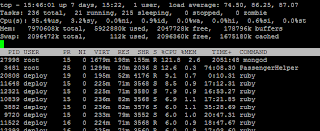
I think there is a problem with Passenger forking. I have to try its solution first.
Right now I'm figuring out how to optimize it.
Here is the CPU usage:

Nov 1, 2011
Oct 31, 2011
Nginx 502 Bad Gateway
It occurs somewhat often on Gamling.org. I'm still trying to figure out what really happens.
I have found on the log and this is the error message:
unix:/passenger_helper_server failed (11: Resource temporarily unavailable) while connecting to upstream
The solutions I have tried
1.
One proposed solution is to increase the buffer size for header.
(http://stackoverflow.com/questions/2307231/how-to-avoid-nginx-upstream-sent-too-big-header-errors)
It does not seem to solve the problem.
2.
The second solution is to disable firewall. It does not solve the problem.
3.
This is the one that actually solves the problem.
The problem is that the backlog queue (for imcoming connection) is full. Therefore, we shall increase it.
The default value of net.core.somaxconn is 128.
I have increased it to 40,000! with this command, sysctl -w net.core.somaxconn=40000.
The default value of net.core.netdev_max_backlog is 1000. I have increased it to 40,000 with this command sysctl -w net.core.netdev_max_backlog=40000.
Also do not forget to set open file limits:
just increase it to 100,000 with ulimit -n 100000
And edit this file /etc/security/limits.conf
That does seem to solve problems just a little.
The real problem is that when Passenger spawns a new instance, it clones a previous process. It also clones THE SOCKET FILE.
This means that all instances use the same socket to connect to MongoDB and Redis.
And there you go a bottleneck!
Oct 28, 2011
Oct 6, 2011
Beware of overriding a controller
The problem that I have found is that
I override one method of a controller in RSpec, and it totally messes up the routing...
I override one method of a controller in RSpec, and it totally messes up the routing...
Sep 30, 2011
Subscribe to:
Posts (Atom)